MIDIFabric’s arpeggiator used to be built into the Rust core. We rewrote it as one of the bundled Lua effects.
The arpeggiator today is a Lua program of about 400 lines, comments included, plus a definition of its control panel. It has the same form as the effects users make, so you can open its code inside the app and read it, and an effect you create from the bundled template can be edited. Scheduling, cancelling and sending MIDI are handled by the app (the Rust core); the Lua code only decides which note to play next, and when.
The control panel
Select the arpeggiator on the routing canvas and its control panel opens.
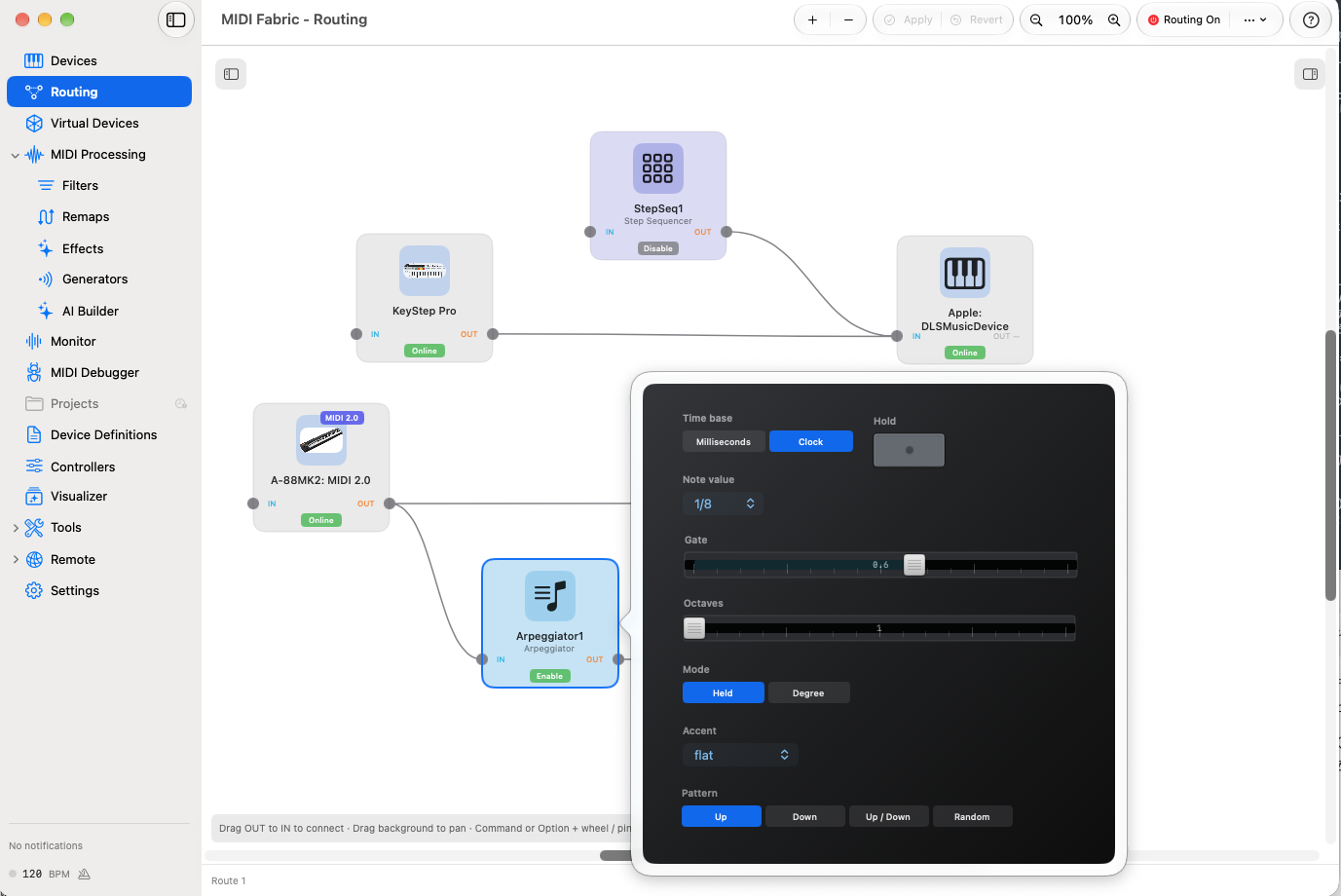
- Time base: set the step interval in milliseconds, or follow MIDI clock. Following clock, it keeps up with tempo changes.
- Note value / Time: the length of one step, as a note value such as 1/8 with clock, or as a time in milliseconds.
- Gate: how much of each step the note sounds. 0.6 means 60 percent.
- Octaves: how many octaves the held notes are spread over.
- Mode: Held plays the notes you hold, in turn. Degree matches the last note you pressed to the chosen scale and plays scale degrees such as 1-3-5. Choosing Degree reveals the Root, Scale and degree controls.
- Accent: a pattern of step levels. A step with 0 is a rest.
- Pattern: Up, Down, Up / Down or Random.
- Hold: keeps playing after you let go of the keys.
The panel’s controls and layout are also written in the definition (Params and Layout), not in code. Changing how the panel looks does not require rebuilding the app.
How the code is put together
The Program tab of the effect editor shows the code.
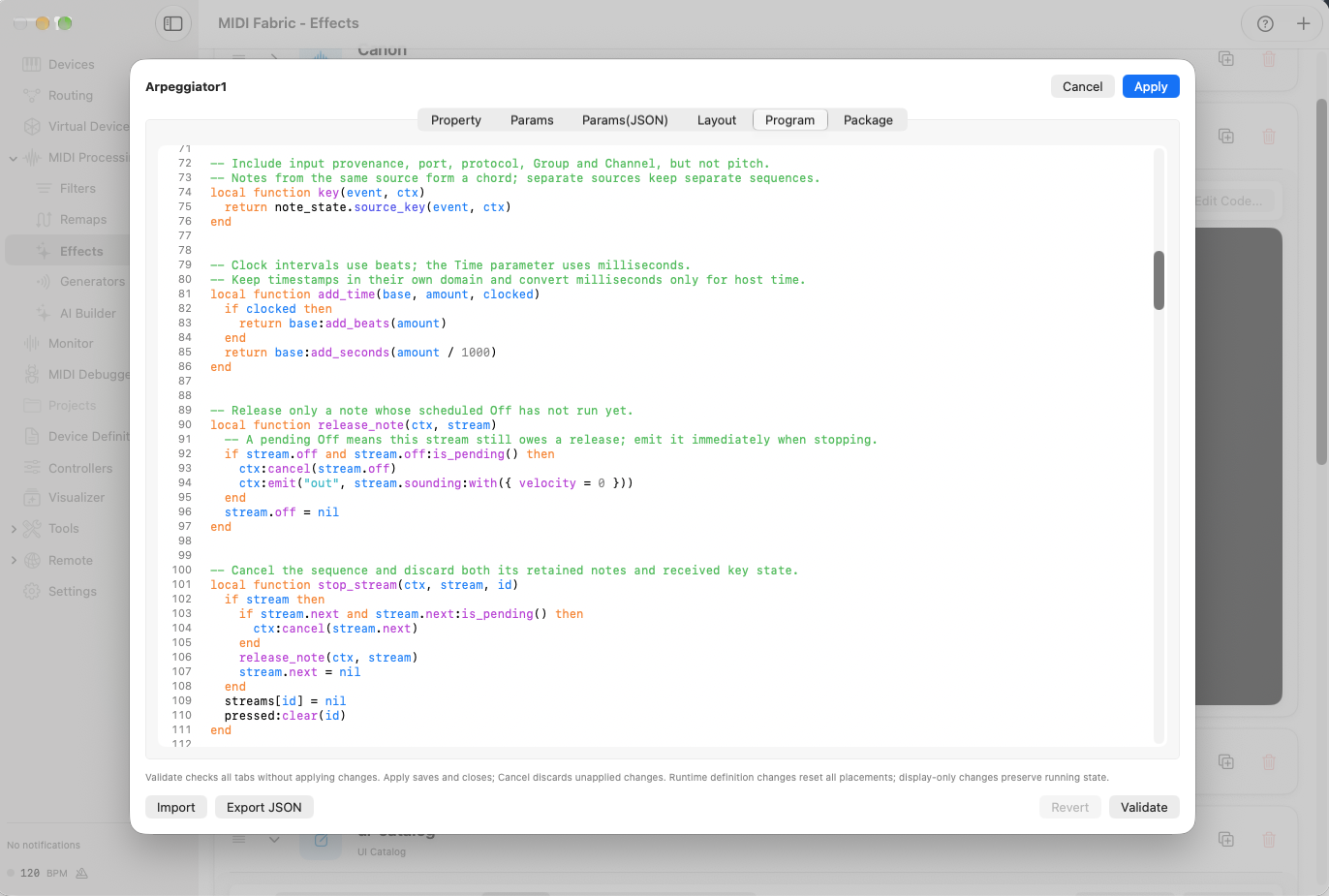
There are two entry points: on_midi, called when MIDI arrives, and on_scheduled, called at a time the effect reserved.
on_midirecords keys pressed and released. On the first Note On it plays the first note right away.- One step is handled in
tick. It builds the candidate notes, uses the accent pattern to decide whether this step is a rest, plays one note and reserves the next step.
local function tick(ctx, stream, id, due)
  local p = ctx.params
  local notes = candidates(stream, p)
  if #notes == 0 then
    stop_stream(ctx, stream, id)
    return
  end

  local now, interval, step_due = step_timing(ctx, stream, due)
  -- A zero accent is a rest: advance the accent step without consuming a pitch.
  local accent = accents[p.accent]
  local gain = accent[stream.step % #accent + 1]
  stream.step = stream.step + 1
  if gain > 0 then
    local index = next_pitch_index(stream, #notes, p.pattern)
    play_note(ctx, stream, notes[index], gain, now, interval)
  end
  schedule_next(ctx, stream, id, now, interval, step_due)
end
Tracking which keys are down is left to note_state, a shared Lua module that comes with the app and that other effects can use too.
Timing is left to the app
The Lua code never runs a timer of its own. It asks to be called again at a given time with ctx:schedule, reserves Note Offs with ctx:schedule_emit, and cancels reservations it no longer needs with ctx:cancel. Keeping track of the reservations and sending on time is the app’s job.
- Following clock, time is counted in beats and never mixed with times in milliseconds.
- If a call comes late, past steps are not played all at once to catch up. Only the next step is reserved again, from now.
- If no clock has arrived yet, the arpeggio does not start and the notes you play pass through as they are.
Details we decided
We read the earlier Rust code and the definition used before the port side by side, and chose the better behavior or fixed it.
- A separate sequence for each input. Input from a different port, protocol, group or channel is never merged into one arpeggio.
- Up / Down does not repeat the end notes. With three notes it goes up and back down, and the top and bottom notes are never played twice in a row.
- Setting changes apply from the next step. The length of the note already sounding and the time of the next reserved step stay as they are.
- Random is repeatable. Random uses a fixed number sequence of its own for each placed effect, so playing the same way right after placing it again gives the same order.
- Stopping does not bring old notes back. After the routing is stopped and started again, notes that were held before do not start playing. All Notes Off (CC 123) and All Sound Off (CC 120) stop the sequence for that input.
- The previous note stops before a new one. A previously reserved Note Off can never cut off a newer note.
What we checked
Automated tests cover every mode, pattern, root, scale, degree set and accent, plus the ends of the note range, note number 0, short notes, re-pressed keys, Note Offs after a setting change, missing and interrupted clock, separation of inputs, and All Notes Off. We also checked on the real routing path that held notes do not come back after the routing is stopped and started again.
What it does not do yet
- MIDI 2.0 notes are not processed. The arpeggiator handles only MIDI 1.0 notes and passes MIDI 2.0 messages through unchanged. The screenshot above has a MIDI 2.0 keyboard output connected; with that combination, you will not get an arpeggio.
- Playing feel on real instruments, resuming after clock is interrupted on real hardware, and touch operation on iPad have not been checked yet.
We will update this page if we learn more.
Why we wrote it in Lua
Kept inside the app, the arpeggiator would be a special part that only bundled effects could be. Written in Lua, bundled effects and the effects you make are the same kind of part. The bundled code becomes an example you can read, and you can copy it and change it to your taste. When you ask an AI for an effect, the AI can use the bundled effects as a guide too (see Letting AI work with a MIDI app without leaving the Mac).
Just as knowledge about gear rides on top of the app as data in device definitions, behavior rides on top of it as Lua programs. That idea is described in How CC 102 became “OP1 Level”.