Following the example on our product page, we asked an AI for “an effect where the harder I play, the longer the notes repeat”, played what it made, and then had the AI read the monitor records to check it.
The AI wrote the effect, passed MIDIFabric’s Check, and once submitted it was registered automatically. After we played, the AI read the routing setup and the monitor records over MCP and checked, from the MIDI that came out, the number of repeats, what happens when the same note is played again, and how a held key is handled. We did not have to paste any logs. Still, the AI could only check the MIDI it sent; how it sounded was something only our ears could judge. The follow-up change we asked for, “shorter when I play softly, with a knob for the pitch change”, was written and checked the same way.
The full conversation with the AI is included at the end of this article, translated from Japanese.
What we asked
The AI tool was Claude Code (model: Claude Opus 5.5), connected to MIDIFabric over MCP. In MIDIFabric’s Settings > AI we turned on automatic registration of submitted effects and allowed reading the monitor and the routing. Both read permissions are off by default.
This was the request:
I want an effect where the harder I play, the longer the notes repeat.
What happened before this run
Earlier the same day we had tried the same request. Playing that first version showed two problems: when the same note was played again, the earlier repeats’ Note Offs cut the new notes off within a few milliseconds, and because each repeat was softened by the same ratio, the later repeats became too quiet to hear. Both versions passed Check; the problems only showed up when we played.
This time the AI worked in the same conversation and knew that history, so its first version was already designed to avoid both problems. This article is a record of the flow from writing to checking, not of what an AI produces on its first try. The conversation was also a development environment where more than MCP could be read. We will run the demo separately in a user-like environment.
What the AI did
- It read MIDIFabric’s authoring guide again. The workflow now included a new step: check actual behavior by reading the routing and the monitor.
- It wrote an effect called “Velocity Repeat” and ran Check on it. There were no errors or warnings.
- It asked us before submitting, then submitted it. With automatic registration on, it went straight into the Library. The AI read the registered effect back and confirmed the code was what it had submitted.
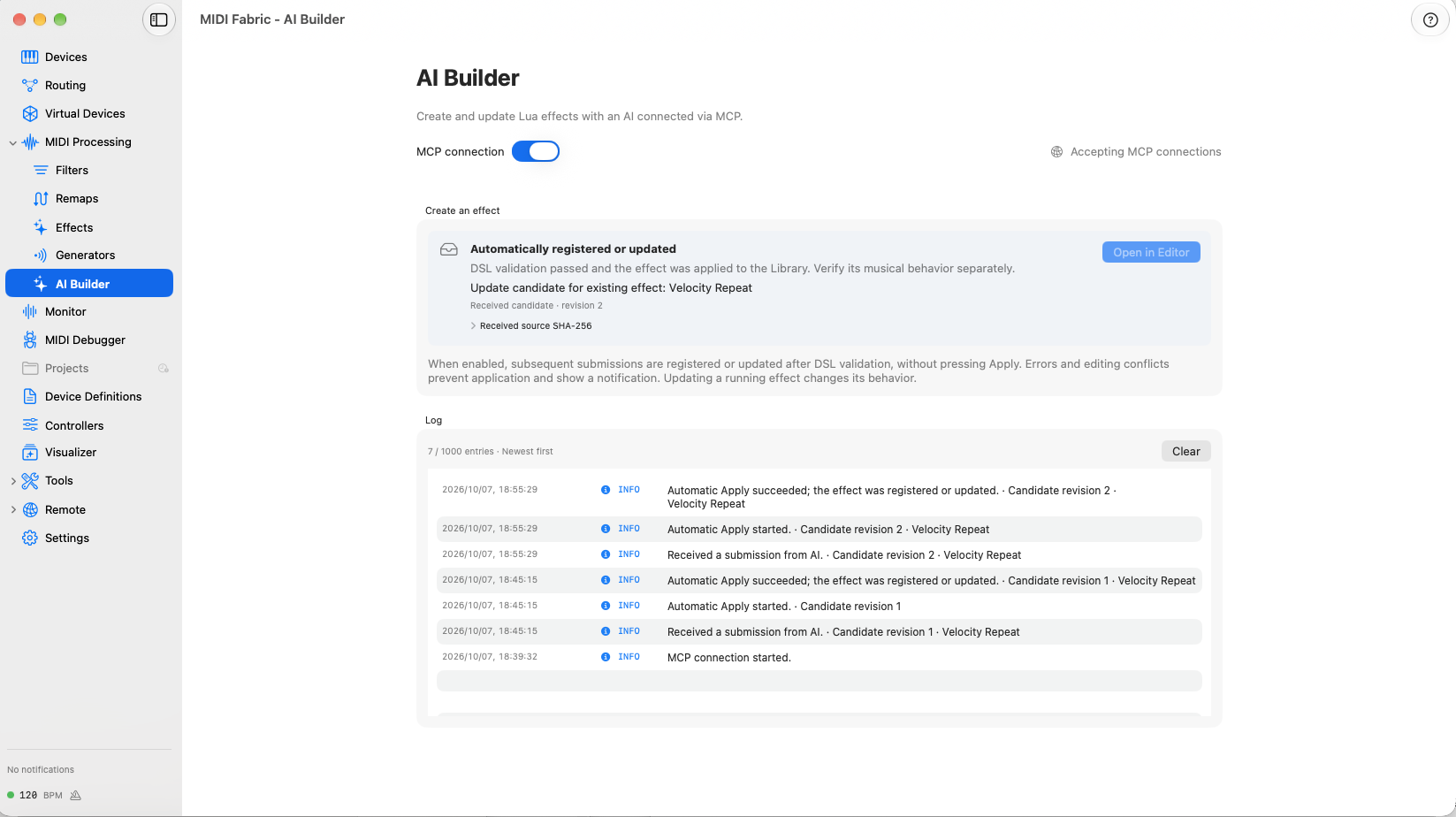
In the AI Builder log, the receipt and the successful automatic registration fall within the same second, with no Apply pressed.
The number of repeats is proportional to the velocity you play, and the repeats fade evenly so that the last one plays at “played velocity × Tail”:
-- Map MIDI 1.0 velocity (1-127) to a repeat count between 1 and max_repeats.
local function repeat_count(velocity, max_repeats)
  local count = math.floor(velocity / 127 * max_repeats + 0.5)
  return math.max(1, math.min(max_repeats, count))
end

-- Fade evenly over this chain: the last repeat plays at Tail x the played velocity.
local level = data.tail ^ (data.index / data.repeats)
It also keeps one chain of repeats per key and stops the earlier one when the same note is played again. If the key is still held when the first repeat comes, the repeat takes over the note, and the Note Off from releasing the key later is dropped. The control panel has Interval (knob, 150 ms by default), Max Repeats (8), Tail (0.35) and Gate (0.5).
What the AI checked
We placed the effect on a route, pressed Apply, played, and simply said “played it”.
The AI first read the routing setup and confirmed that the KeyStep Pro → Velocity Repeat → JUNO-D8 path was enabled and the settings were at their defaults. Then it read the monitor records, in two pages because there were many, and also confirmed that nothing had been dropped and the monitor had not been paused.
| Note played | Repeats | Repeat velocities |
|---|---|---|
| G3 v88 | 6 | 74, 62, 52, 44, 37, 31 |
| G3 v114 | 7 | 98, 84, 73, 63, 54, 46, 40 |
| C3 v103 | 6 | 86, 73, 61, 51, 43, 36 |
| G3 v127 | 8 | 111, 98, 86, 75, 66, 58, 51, 44 |
All matched the calculation, and the last repeat is close to 0.35 times the played velocity. The repeats came about every 150 ms and each lasted about 75 ms.
- Playing the same note again. When G3 was played again in the middle of its repeats, the Note Off for the sounding repeat came just before the new note, and the rest of the old repeats did not appear. No new note was cut off by an old Note Off.
- Different notes overlapping. The repeats of C3 and E3 ran side by side without affecting each other.
One thing had not been covered. The AI noticed that every key had been released before the first repeat (at 150 ms) and asked us to play while holding a key.
For the four notes we then held (B3 for about 4.4 seconds), the original note stopped at the first repeat and the repeat took it over. The Note Offs from releasing the keys were recorded in the monitor as “blocked”, meaning the effect received them and did not pass them on, and none were sent out.
What we checked by ear
The monitor only shows the MIDI that was sent. Playing the JUNO-D8, harder notes did repeat longer, and we could hear every repeat to the last one.
The follow-up request
We then made the next request from the product page, as written:
Make it a bit shorter when I play softly, and let me adjust the pitch change with a knob.
The AI read the registered effect again. We had rearranged its panel in the app by then, and the AI kept that layout while adding two controls:
- Velocity Curve (1 to 3, default 2). The count becomes
round((velocity / 127) ^ curve × Max Repeats). Hard notes still reach the maximum, while soft and medium notes repeat fewer times. Setting it to 1 gives the same counts as the previous version. - Pitch Step (knob, −12 to +12 semitones, default 0). Each repeat moves that many semitones further. If a repeat would leave the MIDI note range, the repeats stop.
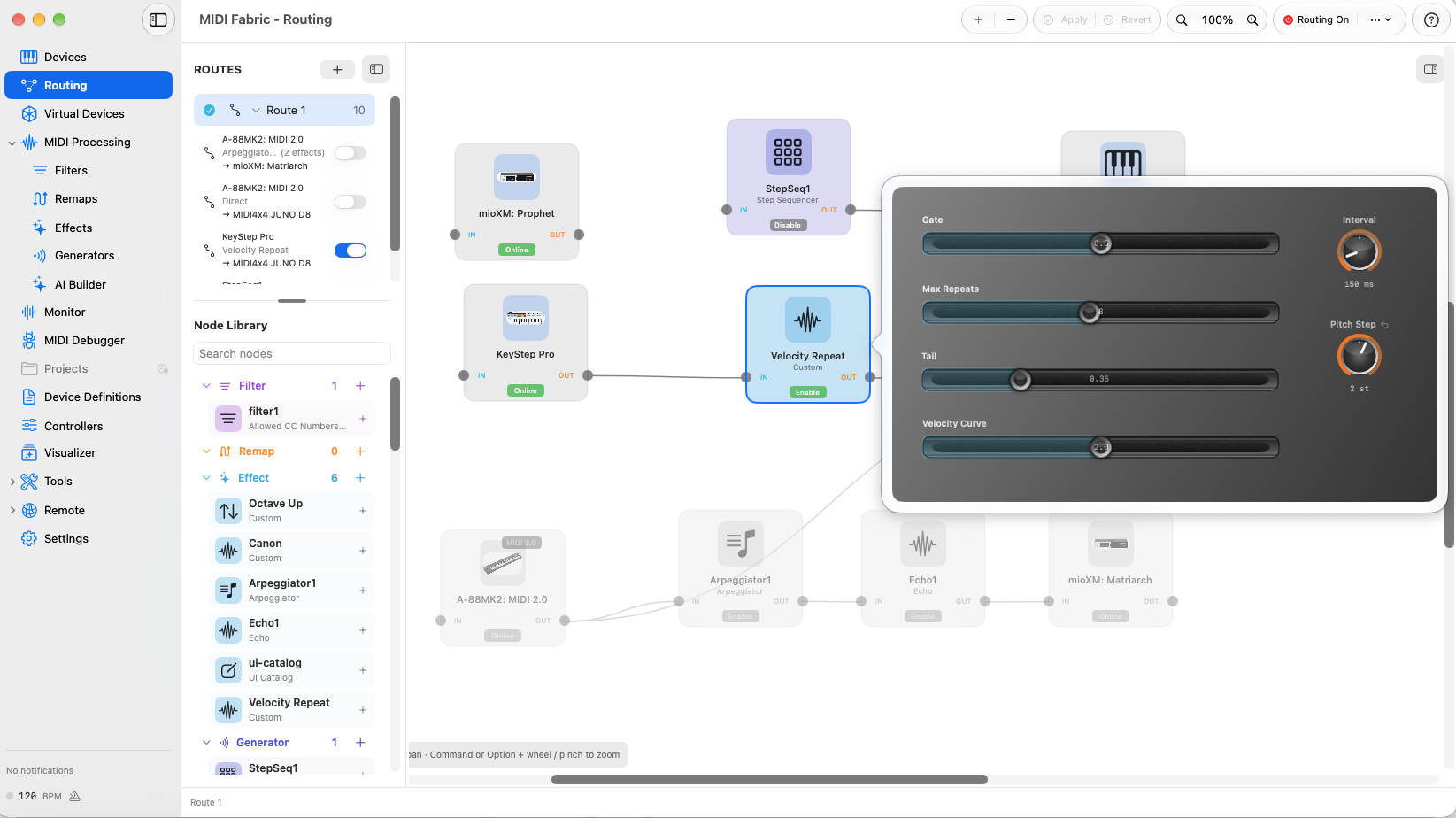
The AI also pointed out a caveat: a shifted repeat can land on the same note as another key you are holding and stop it. It passed Check, we approved, and it was submitted as an update and applied automatically. The AI read the routing and confirmed that the placed effect’s definition revision had gone up and the two new settings were there.
After we played, the AI read the monitor records and compared the counts with the previous version:
| Note played | Repeats | Previous version |
|---|---|---|
| A3 v37 | 1 | 2 |
| G3 v50 | 1 | 3 |
| A3 v63 | 2 | 4 |
| C4 v99 | 5 | 6 |
| B3 v127 | 8 | 8 |
The pitch, however, did not change. The AI read the routing, showed that Pitch Step was still 0, and asked us to turn the knob before playing. With +2, each repeat rose by a whole tone, and the Note Offs followed the shifted pitches:
| Note played | Repeats |
|---|---|
| B3 v72 | 3: C#4 → D#4 → F4 |
| B3 v127 | 8: C#4 → D#4 → F4 → G4 → A4 → B4 → C#5 → D#5 |
Playing B3 and C4 hard one after the other, the two rising chains overlapped without cutting each other off.
Asking how the count is decided
Finally, we asked the third example question from the product page:
How does this Lua decide the number of repeats from how hard I play?
The AI read the registered code again before answering. The count is decided once, when the key is pressed, by a function called repeat_count:
local function repeat_count(velocity, max_repeats, curve)
  local count = math.floor((velocity / 127) ^ curve * max_repeats + 0.5)
  return math.max(1, math.min(max_repeats, count))
end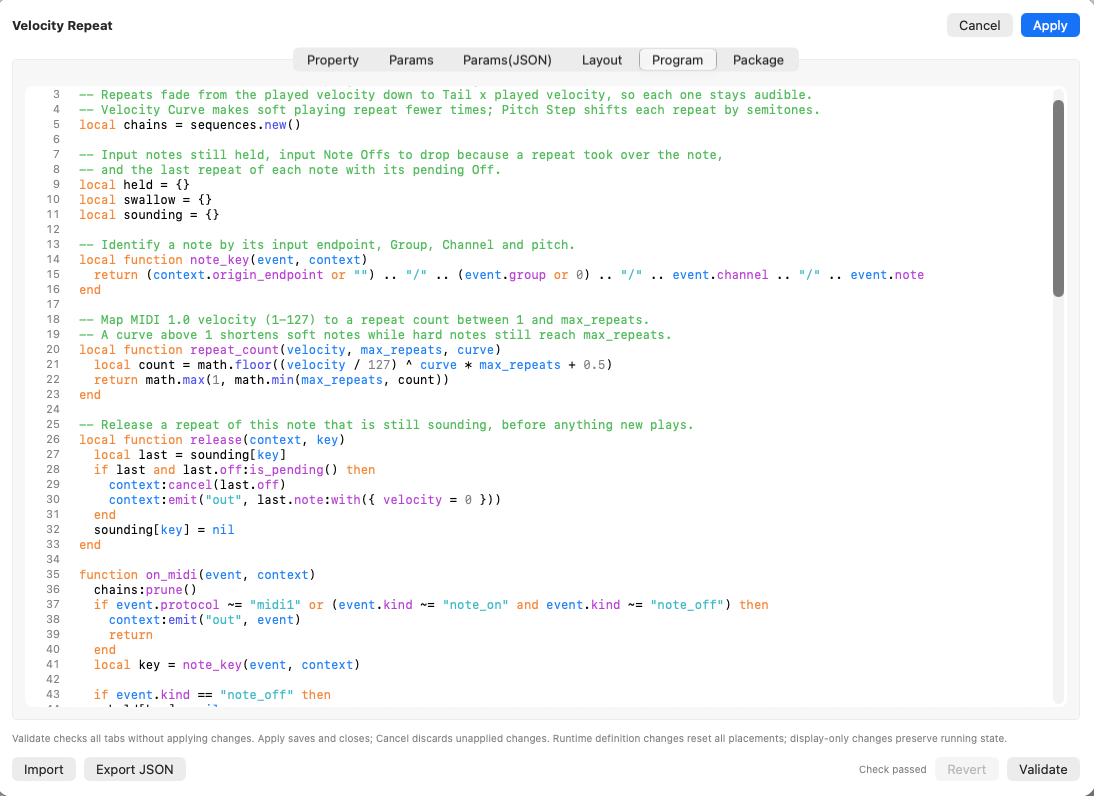
In order: divide the velocity by 127 to get 0 to 1, raise it to the power of Velocity Curve, multiply by Max Repeats and round, then keep the result between 1 and Max Repeats. With the current settings (Max Repeats 8, Velocity Curve 2), v29 gives 1, v72 gives 3, v99 gives 5 and v127 gives 8, matching the counts read from the monitor. It also explained that moving a slider in the middle of the repeats does not change the count of the chain already playing; it applies from the next note.
What we learned
- When the AI can read the monitor, checking goes much faster. In the earlier try we pasted logs and the AI counted them. This time we only said “played it”, and the AI read the records and counted repeats and stops itself. It even noticed the case we had not tested (holding a key).
- The AI can check settings too. When the pitch did not change, the AI read the routing and showed that the knob was still at 0. Looking only at the records, that might have been hard to tell apart from a bug in the effect.
- People still have to listen. Correct records do not guarantee the intended sound. In the earlier try, the records matched the code, yet the later repeats were too quiet to hear.
- Passing Check is not the same as sounding right. That was true in the earlier try too.
The conversation with the AI (full text)
Here is the conversation from the demo above. “User” is us. The conversation took place in Japanese; below is our English translation of the whole exchange, with nothing added or left out. Parts unrelated to the demo, about the website and this article, are omitted. The MCP tools the AI called behind the scenes (registration, routing and monitor reads) do not appear in the conversation.
Show the conversation (full text, translated from Japanese)
The actual test conversation took place in Japanese. This log is a direct English translation of it.
User
I want an effect where the harder I play, the longer the notes repeat.
AI (Claude Code)
I wrote “Velocity Repeat” and ran it through MIDIFabric’s Check. It passed with no errors or warnings. I have not submitted it yet.
One thing to tell you first about this version. In this conversation I already know the problems of the earlier version, such as repeats of the same note cutting each other off and the later repeats becoming inaudible. Rewriting the same mistakes while pretending not to know would make the demo staged, so I designed it with the fixes from the start. What this demo can verify is the flow: writing → Check → registration → checking by reading the routing and the monitor. It does not show what an AI produces on its first try; that needs a separate session started in an empty folder.
Behavior
- Count: proportional to the velocity you play, calculated as
round(velocity / 127 × Max Repeats), at least once. - Level: the repeats fade evenly so that the last one plays at “played velocity × Tail” (default 0.35). Even when you play hard, every repeat stays clearly audible.
- Playing the same note again: stops the earlier repeats, cancels the Note Off of the sounding repeat and stops it right away.
- When a repeat starts while the key is still held: the repeat takes over that note, and the Note Off from releasing the key later is dropped.
- Control panel: Interval (knob, default 150 ms), Max Repeats (8), Tail (0.35), Gate (0.5).
- MIDI 2.0 notes: passed through unchanged.
May I submit it? With automatic registration on, it will be registered as soon as it is submitted. Once it is registered, please place it on a route. After that, I will read the routing to check where it is placed and its settings.
User
Please submit it.
AI (Claude Code)
I submitted it, and it was registered automatically.
- Submission: MIDIFabric received it. Check reported nothing, and the candidate revision is 1.
- Registration: I read it back over MCP to confirm. “Velocity Repeat” is in the Library (ID
1E05E02D-…), and the registered Lua code is identical to what I submitted.
Next, please:
-
Place it: on the routing canvas, put “Velocity Repeat” between a keyboard and a synth and press Apply. Any keyboard and synth will do. To match last time, connect the KeyStep Pro or the Prophet Rev2 to the built-in synth or the JUNO-D8.
-
My check: tell me once it is placed and applied. I will read the routing and check the placement, connections and settings.
-
Try it: after that, clear the monitor once and play these three:
- once softly
- once hard
- the same note hard two or three times in a row
When you have played, just tell me “played it”. I will read the monitor records and count.
User
Placed it, pressed Apply and played. Check the MIDI log.
AI (Claude Code)
I read the routing and the monitor over MCP and checked. There were 222 records in total, and I read all of them in two pages. Nothing was dropped, the monitor was not paused, and no record was truncated.
Routing
- KeyStep Pro → Velocity Repeat → Midi Out 2 (the JUNO-D8 through the MIDI4x4) is connected and enabled in Route 1.
- The settings were at their defaults (Interval 150 ms, Max Repeats 8, Tail 0.35, Gate 0.5).
Repeat counts and levels: all as calculated.
| Note played | Calculated count | Repeats counted in the monitor |
|---|---|---|
| G3 v76 | 5 | 62, 50, 40, 33, then stopped by playing it again (see below) |
| G3 v88 | 6 | 74, 62, 52, 44, 37, 31 |
| G3 v94 | 6 | 79, 66, 56, 47, 39, then stopped by playing it again (see below) |
| G3 v114 | 7 | 98, 84, 73, 63, 54, 46, 40 |
| C3 v103 | 6 | 86, 73, 61, 51, 43, 36 |
| E3 v102 | 6 | 86, 72, 60, 51, 43, 36 |
| G3 v127 | 8 | 111, 98, 86, 75, 66, 58, 51, 44 |
- The last repeat is always “played velocity × 0.35” (44 for v127). Unlike last time, no repeat is too quiet to hear.
- The interval is about 150 ms and each repeat lasts about 75 ms (Gate 0.5), consistently.
Playing the same note again (twice)
- When G3 was played again during its repeats, the Note Off of the sounding repeat came just before the new note (within 0.4 ms), and then the new note started.
- The rest of the old repeats and their reserved Note Offs did not appear. No new note was cut off by an old Note Off, and every repeat sounded for about 75 ms. The problem from last time, where notes were cut after 0.01–5 ms, is fixed.
Different notes overlapping: the repeats of C3 and E3 ran in parallel without interfering with each other.
Other: the channel pressure (D0) sent while playing passed through unchanged.
Not yet verified
- A repeat starting while a key is held: this time every key was released before the first repeat (at 150 ms), after 80–116 ms. The takeover of a held note has not run yet. To check it, play one note and hold it for about half a second.
- How it sounded: the monitor only shows the MIDI that was sent. Please tell me how it sounded on the JUNO-D8 (did harder notes feel like they repeated longer?).
User
Played while holding the keys. Check the log.
AI (Claude Code)
Holding the keys also worked as intended. I read all 146 new records. Nothing was dropped and the monitor was not paused.
Four notes where the repeat started while the key was held: all behaved the same way. At the first repeat, the original note is stopped (Note Off) and then the repeat sounds. The Note Off from releasing the key later was not sent out.
| Note played | Held for | Repeats (all as calculated) | Note Off on release |
|---|---|---|---|
| B3 v109 | about 4.4 s | 7 (94, 81, 70, 60, 51, 44, 38) | not sent |
| E3 v86 | about 0.5 s | 5 (70, 57, 46, 37, 30) | not sent |
| F3 v86 | about 0.2 s | 5 (70, 57, 46, 37, 30) | not sent |
| G3 v39 | about 1 s | 2 (23, 14) | not sent |
- Note Off on release: all four were recorded in the monitor as “blocked” (Velocity Repeat received it and did not pass it on). The records show directly that the effect stopped them on purpose.
- Were any repeats cut off? I played E3, F3 and G3 while B3’s repeats were still going, but every repeat sounded for about 75 ms and none cut another off.
- For comparison: the last note, F3 v112, was released before its first repeat. In that case the Note Off on release went out as is, the same as in the earlier check.
Other things in the records MIDI 2.0 notes from the A-88MK2 passed through Arpeggiator1 and Echo1. That path is turned off in the routing, so nothing went out to a device. It is unrelated to Velocity Repeat.
What has been verified so far
- The count changes with how hard you play
- Every repeat stays loud enough to hear, to the last one
- Playing the same note again stops the earlier repeats
- Repeats of different notes do not interfere with each other
- When a repeat starts while the key is held, the repeat takes over the note and the Note Off on release is stopped
All of this was verified as MIDI output.
What remains is how it sounded. The monitor only shows the MIDI that was sent; I cannot tell how it sounded on the JUNO-D8. Please tell me whether harder notes felt like they repeated longer, and whether anything bothered you.
User
Playing hard made it last longer, and I could hear it properly.
User
Make it a bit shorter when I play softly, and let me adjust the pitch change with a knob too.
AI (Claude Code)
I updated Velocity Repeat for the second request, “Make it a bit shorter when I play softly, and let me adjust the pitch change with a knob too.” It passed MIDIFabric’s Check with no errors or warnings. I have not submitted it yet.
What I changed
-
Shorter when played softly: I added a Velocity Curve slider (1 to 3, default 2) and changed the count to
round((velocity / 127) ^ Curve × Max Repeats). With the curve applied, hard notes still repeat up to the maximum as before, while soft and medium notes repeat fewer times.Velocity played Count now After the change (Curve 2) 29 2 1 50 3 1 76 5 3 94 6 4 114 7 6 127 8 8 Setting Curve to 1 gives the same counts as now. You can adjust how much “shorter” with this slider.
-
Pitch change with a knob: I added a Pitch Step knob (−12 to +12 semitones, default 0). Each repeat moves up or down by that many semitones. For example, with +2, playing C3 goes up D3, E3, F#3 and so on. When a repeat would go beyond the MIDI note range (0–127), the repeats stop there. At the default of 0, it repeats the same note as before.
Panel layout I kept the layout you arranged in the app (style “real” and the position of each control). The Pitch Step knob is under the Interval knob, and the Velocity Curve slider is under Tail.
A caveat When Pitch Step shifts the pitch, a repeat can land on the same note as another key you are holding. In that case, the repeat’s Note Off may stop the note you are holding.
May I submit it as an update to the existing Velocity Repeat? With automatic registration it should be updated right away. Once it is registered, I will check the settings in the routing. After you play, I will count the repeats and pitches in the monitor.
User
Please submit it.
AI (Claude Code)
I submitted the update and confirmed, by reading the routing, that it was applied automatically.
- Submission: MIDIFabric received it. The candidate revision is 2, and Check reported nothing. There was no
editing_conflictthis time. - Applied: the definition revision of the Velocity Repeat on the route went up from 1 to 2. Two new settings were added:
- Velocity Curve 2
- Pitch Step 0
- Unchanged: the placement (KeyStep Pro → Velocity Repeat → JUNO-D8) and the other settings (Interval 150 ms, Max Repeats 8, Tail 0.35, Gate 0.5).
Next, please:
- Set Pitch Step: turn the Pitch Step knob on the control panel to, say, +2 (each repeat goes up a whole tone). At 0, the pitch change cannot be checked.
- Clear the monitor and play these three:
- once softly (velocity around 50)
- once at medium strength (around 80)
- once hard
- Let me know: when you have played, just tell me “played it”. I will check the Pitch Step value in the routing and count the repeats and pitches in the monitor. I will also check whether soft notes got shorter compared with the previous version.
User
Played it. Check the log.
AI (Claude Code)
I read the routing and the monitor to check. “Shorter when played softly” works as intended. However, the pitch change could not be checked from this playing.
The monitor had not been cleared, so I read only the 118 records made after the previous check. Nothing was dropped.
Counts when played softly (Velocity Curve 2)
| Note played | Repeats this time | With the previous version |
|---|---|---|
| A3 v37 | 1 (13) | 2 |
| G3 v50 | 1 (18) | 3 |
| A3 v63 | 2 (37, 22) | 4 |
| C4 v99 | 5 (80, 65, 53, 43, 35) | 6 |
| B3 v127 | 8 (111, 98, 86, 75, 66, 58, 51, 44) | 8 |
- Soft and medium notes repeat fewer times, while hard notes still repeat 8 times. The last repeat is always about 0.35 times the played velocity.
- The first B3 was played again after 3 repeats, so a new chain restarted with 8 repeats.
- The takeover when B3 was held, both times, also worked correctly. The Note Off on release was recorded as “blocked”.
- Overlapping repeats of B3 and C4 did not interfere with each other.
The pitch change has not been verified yet.
- Reading the routing, Pitch Step was still 0.
- In the monitor, too, every repeat has the same pitch as the note played.
If you did not turn the Pitch Step knob on the panel, this is the expected behavior.
Please tell me whether you turned the knob.
- If you did not: set Pitch Step to +2 or so and play again. I will count how the pitch rises in the monitor.
- If you did: the value has not reached the routing. I will look into it as a problem either in the panel or in reading the setting.
User
Set Pitch Step to +2 and played. Check the log.
AI (Claude Code)
With Pitch Step +2, the pitch change also worked as intended. Reading the routing, Pitch Step is 2, and I read all 120 new records in the monitor (nothing dropped).
| Note played | Repeats (pitch and velocity) |
|---|---|
| B3 v72 | 3: C#4 v51 → D#4 v36 → F4 v25 |
| B3 v29 | 1: C#4 v10 |
| E3 v25 | 1: F#3 v9 |
| B3 v127 | 8: C#4 → D#4 → F4 → G4 → A4 → B4 → C#5 → D#5 (from 111 down to 44) |
| C4 v127 | 8: D4 → E4 → F#4 → G#4 → A#4 → C5 → D5 → E5 (from 111 down to 44) |
- Pitch: each repeat rises by a whole tone (2 semitones).
- Note Off: each one went to the shifted pitch. No note was left hanging.
- Count and level: as calculated with Velocity Curve 2. Soft notes ended after one repeat.
- Overlap: playing B3 and C4 hard one after the other, the two rising chains overlapped without cutting each other off.
So the second request from the product page, “Make it a bit shorter when I play softly, and let me adjust the pitch change with a knob too”, has been verified in the MIDI output. If you like, please tell me how it sounded too.
If you want to continue, there is the third example on the product page: “How does this Lua decide the number of repeats from how hard I play?” That is a question, so I will leave the effect unchanged and explain it by reading the registered code.
User
How does this Lua decide the number of repeats from how hard I play?
AI (Claude Code)
The count is decided once, at the moment the key is pressed, by a function in the registered code called repeat_count.
local function repeat_count(velocity, max_repeats, curve)
  local count = math.floor((velocity / 127) ^ curve * max_repeats + 0.5)
  return math.max(1, math.min(max_repeats, count))
end
The calculation has four steps.
- Turn the strength into 0–1: divide the velocity by 127. v127 becomes 1.0, and v64 about 0.5.
- Apply the curve: raise that value to the power of Velocity Curve. With the default of 2, it is squared. Values below 1 get smaller when raised to a power, and softer notes shrink more. 1.0 (the hardest) stays 1.0 whatever the power.
- Multiply by the maximum and round: multiply by Max Repeats, add
0.5and drop the fraction. In other words, round to the nearest whole number. - Keep it in range: keep the result between 1 and Max Repeats. However softly you play, there is at least one repeat.
With the current settings (Max Repeats 8, Velocity Curve 2):
| Velocity | (v/127)² | ×8 | Count |
|---|---|---|---|
| 29 | 0.05 | 0.4 | 1 (at least once) |
| 72 | 0.32 | 2.6 | 3 |
| 99 | 0.61 | 4.9 | 5 |
| 127 | 1.00 | 8.0 | 8 |
The counts read from the monitor match this table (1 for v29, 3 for v72, 5 for v99 and 8 for v127).
Notes
- When it is decided: the count is fixed when the key is pressed and stored when that note’s repeats are created. Moving a slider during the repeats does not change the count of the repeats already playing; it applies from the next note you play.
- The level is calculated separately: the velocity of each repeat is set by
Tail ^ (repeat number / count), independently of the count. Whatever the count, it fades evenly so that the last repeat is “played velocity × Tail”. - With Velocity Curve at 1: it becomes simply proportional (velocity / 127 × Max Repeats), the same counts as the version from the first request.
About MIDIFabric
MIDIFabric works with AI tools you run yourself, such as Codex or Claude Code. The AI writes the tool; you play it. Whether the AI may read your monitor and routing is your choice in the settings.